Trading basics
MT5 Orders, Deals & Positions: Order, Deal, Position Beginner Guide
Many beginners are confused when they click once to place an order but see Order, Deal, and Position records in MT5. Some worry about duplicate orders; others see fills in history and think trades are still open; others cannot tell whether they still have exposure or where to look.
Many beginners mix these layers. Separating them makes Trade, History, and reports much clearer.
Order
The instruction—filled or not, check Deal.
Deal
Fill fact—what happened; essential for review.
Position
Account state now—whether you still have exposure.
1. Why does MT5 separate Order, Deal, and Position?
Beginners often ask: why not one “trade record”? Because trading looks different at each stage.
- You click buy or sell → that is only a request (may fill instantly, partially, be rejected, or wait as pending).
- The market executes part of it → a Deal is recorded.
- After a fill → you may keep a Position, or close out with no new exposure.
MT5 splits this into three layers—they are not duplicates but stages of one process:
- Order: the instruction you sent;
- Deal: the fill that actually happened;
- Position: what the account still holds now.
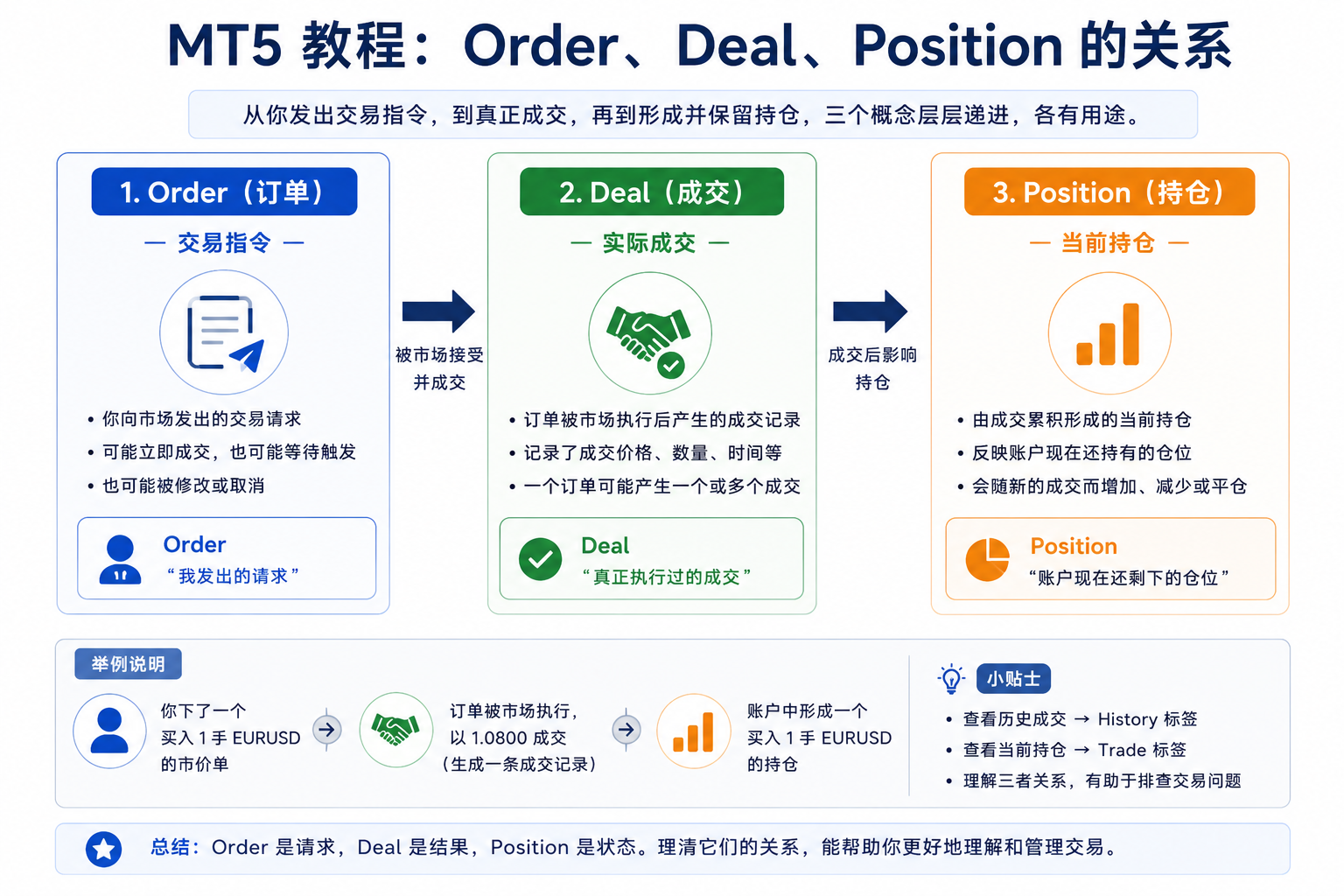
2. What is an Order?—the instruction you send
Think of Order as the instruction. Buy/sell clicks, pending orders, and edits are requests to the server—that is Order.
- A Buy Limit not triggered → may be a waiting Order.
- A fast market order → you see both Order and matching Deal in history.
- Invalid stop distance or closed market → Order may never become a Deal.
Do not treat Order as “I already have a position.” Order is “I want this”; Deal shows what ran.
3. What is a Deal?—a fill that actually happened
Deal is the fill record: at a time and price, a buy/sell actually happened.
- One market buy filled in one go → may be one Deal;
- If split → multiple Deals;
- Closing also creates Deals.
Deals matter for review: time, side, price, volume, fees, P/L, and open/close context.
4. What is a Position?—what the account holds now
Position is what most beginners need: “Do I have exposure now?”
For symbol, side, size, floating P/L, SL/TP → check Position in Toolbox → Trade.
5. Why can one Order produce one or many Deals?
One Order does not always mean one Deal . With thin liquidity, large size, fast markets, or exchange symbols, partial or split fills are common.
Example:Buy 2 lots → may fill at once or 1+1 → one Order, multiple Deals.
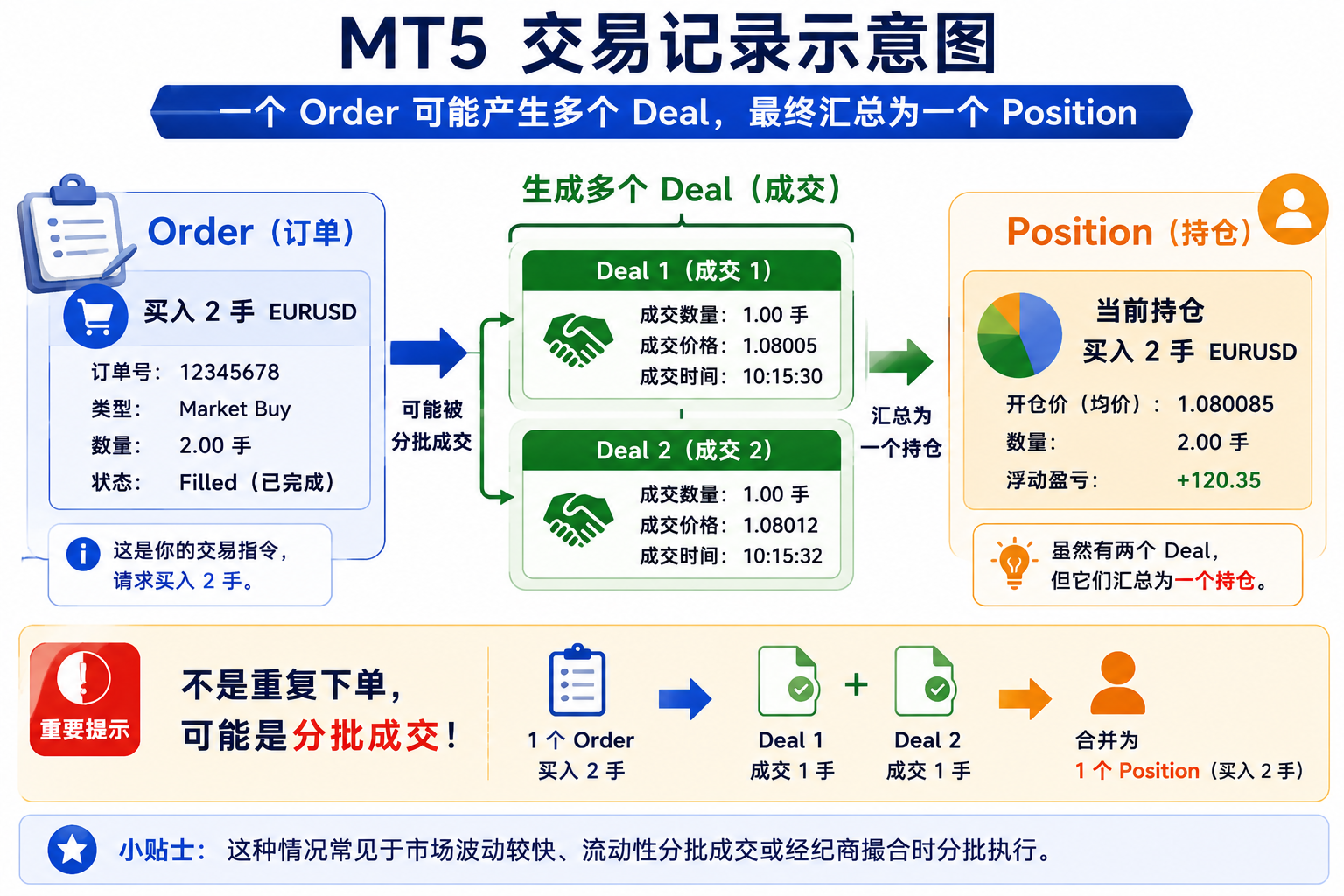
Multiple Deals after one click? Check same parent Order and total volume—not necessarily duplicate orders.
6. Why history fills are not the same as open positions
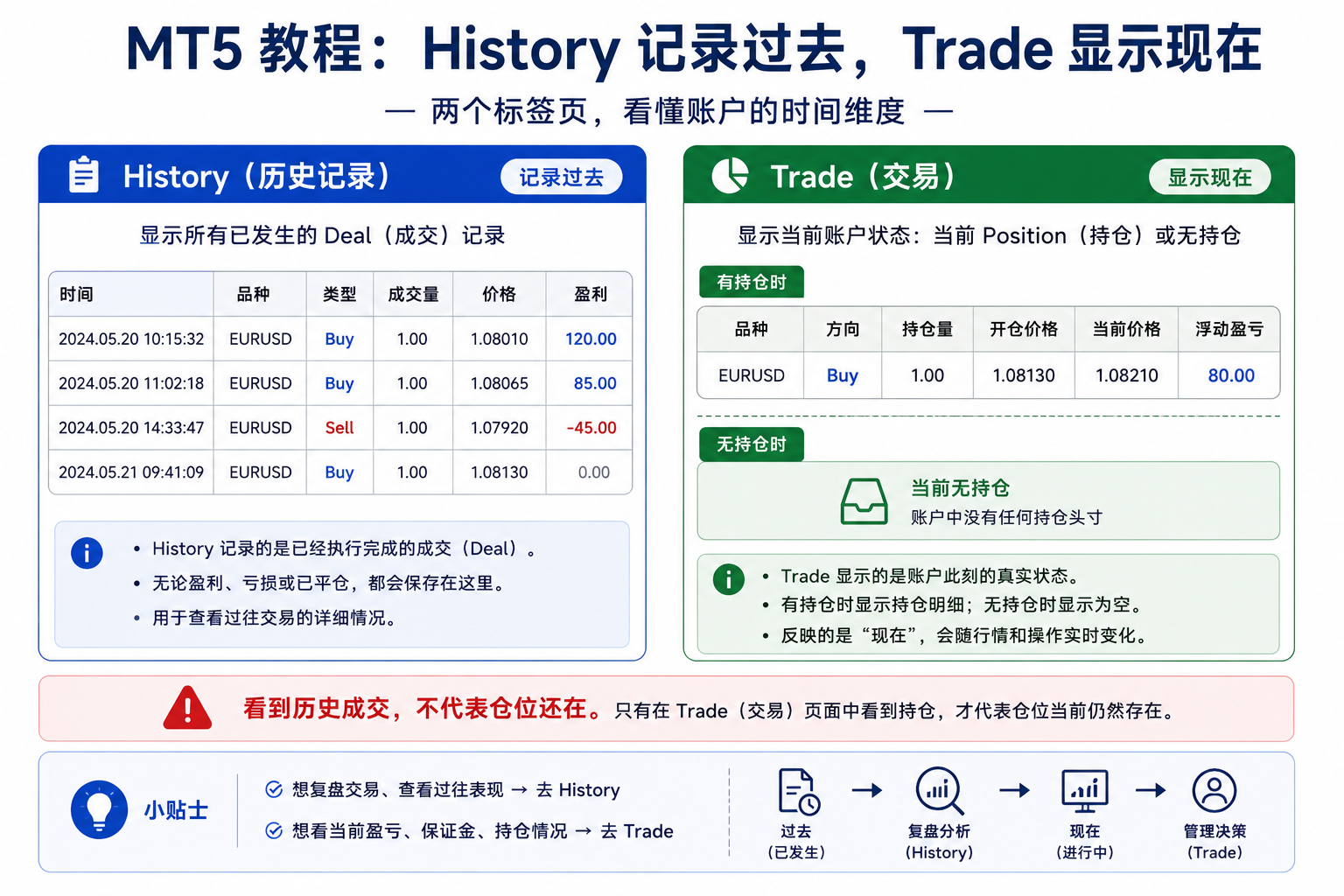
A fill in History ≠ open position now. It only proves that fill happened.
Example:Buy 1 lot EURUSD → buy Deal; sell 1 lot to close → sell Deal. Both stay in History, but Trade may show no position.
7. How Position differs under netting vs hedging
MT5 uses Netting or Hedging—this changes how Position lists look.
Netting account
Usually one net position per symbol. Buy 1, sell 0.4 → net long 0.6; overshoot may flip net short.
Hedging account
Multiple independent positions per symbol—e.g. 1 long + 0.4 short shown separately.
Same Order/Deal can yield different Position under different rules—not necessarily a bug.
If reverse orders do not split into two rows, check netting mode.
8. Where to find Order, Deal, and Position in MT5
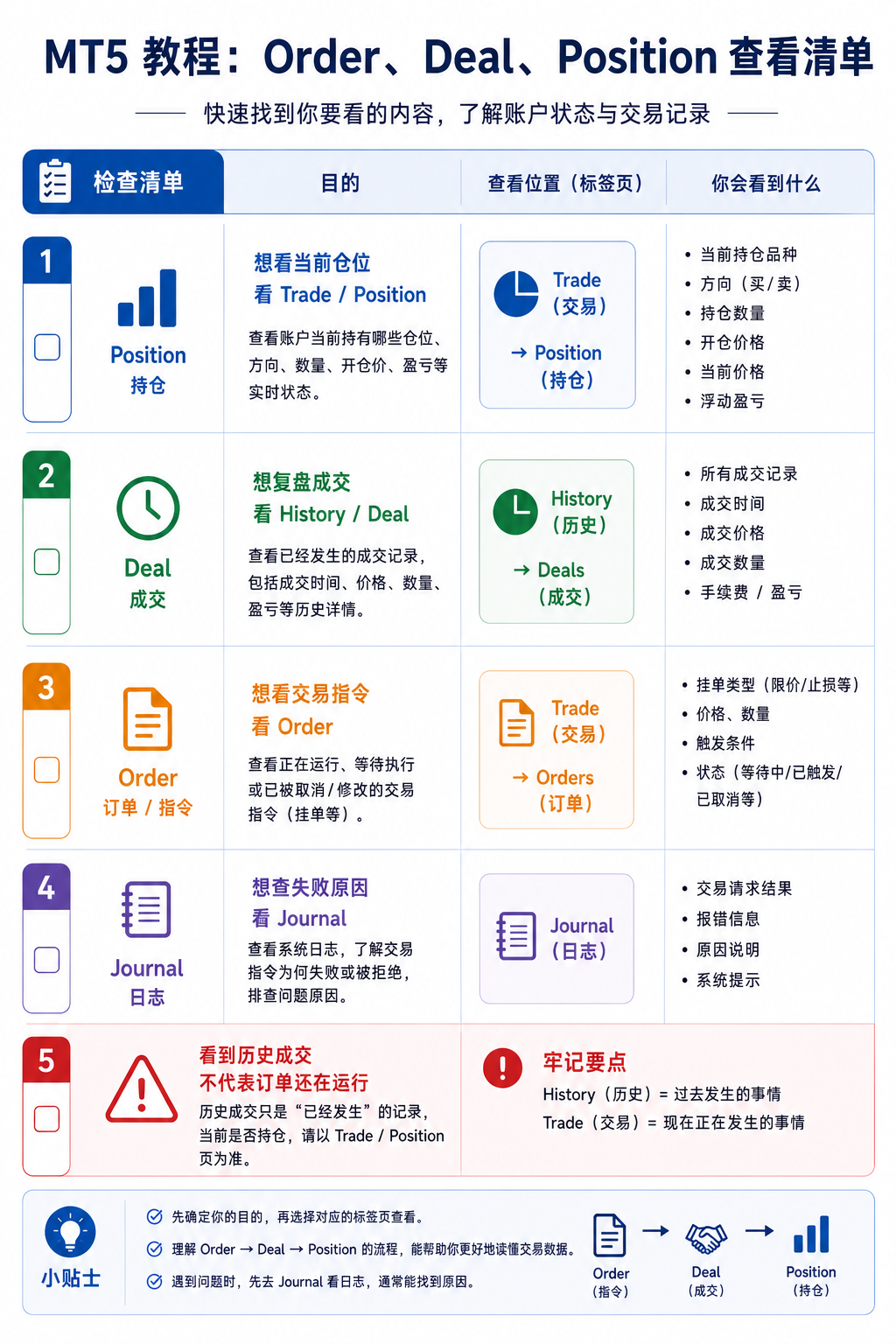
Current Position: Trade
Path: Toolbox → Trade—open positions and pending orders. Empty Trade does not mean you never traded; check History.
History Order / Deal: History
Path: Toolbox → History for orders, deals, fees. UI may toggle Orders, Deals, Positions (history)—varies by build.
Troubleshooting: Journal
For rejections and server messages → Journal often has the detail.
In History you can review order/deal flow, commission, swap, deposits/withdrawals, filter by time, or export reports.
9. What to scan first when reviewing
Depends on your question:
- Do I have exposure now?
- Check Position in Trade—not History alone.
- What actually filled?
- Deal is ground truth: price, size, time, fees.
- What instruction was sent?
- Order: pending, edits, triggers, cancellations.
- Why did it fail or look wrong?
- Also Journal (EAs, network, server errors).
Suggested order:Trade → History → Journal.
10. Common mistakes
- Myth 1:Treating Order as filled—pending or rejected orders are not Deals.
- Myth 2:Treating Deal as still open—may be old entry already closed.
- Myth 3:Multiple Deals = clicked many timesSplit fills from one order can look the same.
- Myth 4:Reverse on same symbol always adds a second row—under netting it often changes net size.
- Myth 5:Relying only on chart order lines—lines may hide or expire; trust Trade.
11. One-line memory aid
- Order:What I sent.
- Deal:What the market actually filled.
- Position:What the account still holds.
Order = request, Deal = execution, Position = result.
12. Summary
- Order:Your trading instruction.
- Deal:The fact of a fill.
- Position:Current open exposure.
Now → Position in Trade; past → Deal/Order in History; why → Journal.
Once instruction, fill, and position are clear—plus netting/hedging—records make sense.
Next: practice editing SL/TP, drag lines, what pending vs position allows, partial close on demo.
FAQ
FAQ: MT5 Order, Deal, Position
Does an Order in MT5 mean it is already filled?
No. Order is an instruction—it may fill, wait, fail, or cancel. A trade happened only if there is a Deal.
Does a Deal mean I still have a position?
No. Deal is historical. It shows a past fill, not current exposure. Check Position in Trade.
Why do I see multiple Deals after one click?
One Order may split into partial fills. Check volume and time before assuming duplicate orders.
Where do I see open orders and positions now?
Toolbox → Trade at the bottom of MT5—open positions and pending orders.
For review, Order or Deal?
For actual fills, Deal matters more; for what you sent, Order. Full review uses both.
Why can’t I see long and short Position on the same symbol in netting?
Netting keeps one net position per symbol. Reverse orders adjust or flip net size—not a separate leg.
Why is there a fill in History but no position in Trade?
Likely closed or netted out. History is past; Trade is now.
Share this article
If helpful, copy the link for others.